mac mini display (resolution) problem

Joined
May 27, 2015
Messages
22
Reaction score
0
Hello and thanks:

Dell Ultrasharp 1909 wb widescreen LCD. My OS X Mavericks,
I believe the connection is VGA to RGB
and I I tried the PRAM/NVRAM (with the help of youtube) but that didn't help. I booted up this morning hoping that it would return to the original desktop display screen but it was the same as it was when I shutdown last night.
 

Cory Cooper

Moderator
Joined
May 19, 2004
Messages
11,120
Reaction score
506
Thanks for the additional information.

-Is there an aspect control on the Dell?
-Have you tried changing resolution settings in  > System Preferences... > Displays?

C
 
Joined
May 27, 2015
Messages
22
Reaction score
0
Greetings:

On the monitor I did try the menu, display settings, auto adjust and the "the 'other adjustments' and nothing changed.
The menu settings, it's set at 1024 x 768, (which corresponds with Dell monitor) 1280 x 960 at 60 hertz, it made the icons and the text smaller but they're still "squeezed", along with the different applications. I really appreciate your suggestions, thanks
 

Cory Cooper

Moderator
Joined
May 19, 2004
Messages
11,120
Reaction score
506
Hmmm..I am running out of ideas.

Would it be possible and would you be willing to take a couple of photos of the issue and post them so we can see exactly what the issue is?

C
 
Joined
May 27, 2015
Messages
22
Reaction score
0
Hello, sorry I haven't gotten back to you sooner (real life got in the way). I'm attaching 3 photos. Hope this helps.
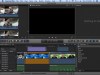
It looks like because of file size I can only send one. You can see that the FCPX interface is "squeezed" and too large for my screen. Also When I tried to send a full size image it covered most of the text message.

Thanks


FCPX.png
 

Cory Cooper

Moderator
Joined
May 19, 2004
Messages
11,120
Reaction score
506
Thanks for the screenshot.

-Does the screen fill to the screen, or are there black bars on the left and right sides? If so, then it is not set on a widescreen display setting. The native resolution of that Dell is 1440x900, so look for that resolution the Displays preferences. You can select Scaled to have access to other resolutions.

-To get FCP to "fit" in the screen, click and drag the top of the window, just to the left of where it says Final Cut Pro, to the right until you can see the three windows controls (usually red/yellow/green.) Then, click the green one and the window should "shrink horizontally to fill the screen.

C
 
Joined
May 30, 2015
Messages
16
Reaction score
0
^ Yeah. If the "native" resolution is 1440x900, set it to that in the resolution settings. Things may look squeezed since the resolution is set to a different setting.
 
Joined
May 27, 2015
Messages
22
Reaction score
0
Hello:

I'm sending another screen shot of the VGA display, as you can see there is no 1440 x 900 setting. When I bootup, the mac startup screen is all ready "squeezed" it's not just the apps, (Final Cut Pro X, my Email, System preferences, etc. I know there has to be a correct setting since it was there from the day the Mac mini was delivered up to last week. It's not that I can't work with it as it is now but I would like display screens be the correct size. Thanks for all your help.

Screen Shot 2015-05-30 at 8.10.54 AM.png
Screen Shot 2015-05-30 at 8.12.04 AM.png
 

Cory Cooper

Moderator
Joined
May 19, 2004
Messages
11,120
Reaction score
506
It is strange that it doesn't show that resolution. I have seen this issue in the past with different Mac/third-oarty display combinations. The part that is confusing is that it worked previously...was it actually on 1440x900? I would try the 1400x1050 setting and see if that is closer.

Have you tried changing settings in the display itself? What is Display Settings > Wide Mode set to - 4:3 or full screen?

Also, I see that you are connecting it via a VGA adapter. I would recommend getting an Apple Mini DisplayPort to DVI adapter so you can run it via a digital connection versus a VGA analog connection.

C
 
Joined
May 27, 2015
Messages
22
Reaction score
0
Mr. "C"

After I read your last rely I wanted to check the back make sure of the connections and to see if one of my cables would work. Then I noticed that the cable wasn't completely Plugged in. When I rebooted everything was back to regular aspect. I'm still going to try your recommendation ( Apple Mini DisplayPort to DVI adapter). And again thanks for your help.


Chuck

Startup Screen.jpg
FCPX SCREEN.jpg
 

Cory Cooper

Moderator
Joined
May 19, 2004
Messages
11,120
Reaction score
506
HA! Something we didn't even think of. Glad it's working again.

It's up to you if you want to change to the other adapter. If it's working, you may not notice a difference. You could always return it if it doesn't change anything.

C
 
Joined
May 27, 2015
Messages
22
Reaction score
0
I've already switched, it took awhile for the monitor to find the the signal but everything is OK, I'm keeping my fingers crossed, I know that not very technical, but what the hell! If I need help in the future I'm looking for you.

See ya

Chuck
 

Ask a Question

Want to reply to this thread or ask your own question?

You'll need to choose a username for the site, which only take a couple of moments. After that, you can post your question and our members will help you out.

Ask a Question

Top