
Sequoia 15.6.1 doing weird things

Joined
May 3, 2024
Messages
9
Reaction score
0
These things were actually happening in 15.6.1, also.

When I do screen captures, I have them sent to my desktop. Shortly after the last 15.6.1 update, those screen captures appear "gray out". This also happens in things I download. For instance, I downloaded a photo mask that shows black and white in the website, but when downloaded to my desktop, it appears to be gray and white. Colored downloads do the same, but in very muted colors.

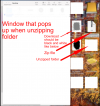
Also, when I open zip files that are on my desktop, it opens a window that show all the items on my desktop, causing me to have to do another click to close that window.

WHAT'S up??? I haven't changed any preferences or settings. These started happening after an update to 15.6.1 as I said earlier.
 

Attachments

  • weird.png
    weird.png
    358.5 KB · Views: 40
Joined
Feb 14, 2021
Messages
1,232
Reaction score
168
These things were actually happening in 15.6.1, also.

When I do screen captures, I have them sent to my desktop. Shortly after the last 15.6.1 update, those screen captures appear "gray out". This also happens in things I download. For instance, I downloaded a photo mask that shows black and white in the website, but when downloaded to my desktop, it appears to be gray and white. Colored downloads do the same, but in very muted colors.

Also, when I open zip files that are on my desktop, it opens a window that show all the items on my desktop, causing me to have to do another click to close that window.

WHAT'S up??? I haven't changed any preferences or settings. These started happening after an update to 15.6.1 as I said earlier.
Sequoia has since been updated to 15.7.1, build (24G231). I suggest doing the latest update and check afterwards if the issues have been solved.
 
Joined
May 3, 2024
Messages
9
Reaction score
0
Sequoia has since been updated to 15.7.1, build (24G231). I suggest doing the latest update and check afterwards if the issues have been solved.
I didn't know about that update. I've been avoiding Tahoe until they get, hopefully, the bugs worked out. I'm tired of things going wonky, when they used to work! If it isn't broke, don't "fix" it!

I'l check out 15.7.1, thanks!
 
Joined
Feb 14, 2021
Messages
1,232
Reaction score
168
I didn't know about that update. I've been avoiding Tahoe until they get, hopefully, the bugs worked out. I'm tired of things going wonky, when they used to work! If it isn't broke, don't "fix" it!

I'l check out 15.7.1, thanks!
I’m fortunate to have two 4-TB external SSDs so I can maintain four self-contained installations of Sequoia and Tahoe in different stages of beta, RC, or final. This gives me the chance to test my main apps, mostly Creative Cloud, Microsoft, and several very specialized utilities. Depending on how comfortable I feel about them, I can decide when to update my main drive, and to what level. Presently, the latest non-beta version of Tahoe is rock-solid, so I decided to update my main drive to macOS 26.0.1 (25A362). So far, so good.

I was running 15.7.1 for a while before Tahoe and never had to report any issues to Apple. Should be good.
 

Ask a Question

Want to reply to this thread or ask your own question?

You'll need to choose a username for the site, which only take a couple of moments. After that, you can post your question and our members will help you out.

Ask a Question

Top