
You are using an out of date browser. It may not display this or other websites correctly.
You should upgrade or use an alternative browser.
You should upgrade or use an alternative browser.
Autsave
- Thread starter Papa_Doc
- Start date

- Joined
- Mar 24, 2024
- Messages
- 337
- Reaction score
- 31
On word processors like the native Pages and MS Word you should get the option to choose "Save or Revert Changes" as below, but not Notes or other apps like Photos of course because you approve changes within the app. I assumed it would be the same for Numbers, I don't have it, don't use it. As for PDF's, what app are you using to edit them?

I am unaware of any setting to enable or disable it in Pages. I normally use Autosave in MS Word but I have Versions on as well.
I am unaware of any setting to enable or disable it in Pages. I normally use Autosave in MS Word but I have Versions on as well.
- Joined
- Mar 24, 2024
- Messages
- 337
- Reaction score
- 31
Save Changes Before Closing Mac Docs;
The "Ask to keep changes when closing documents" option, which allowed users to prevent macOS from auto-saving changes when closing documents, was removed in macOS Ventura (2022).
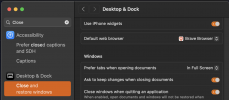
I'm not sure what macOS you're using but if you search in macOS Sequoia (2025); System Settings you will find, "Ask to keep changes when closing documents" which is the only current equivalent I can locate.
The "Ask to keep changes when closing documents" option, which allowed users to prevent macOS from auto-saving changes when closing documents, was removed in macOS Ventura (2022).
I'm not sure what macOS you're using but if you search in macOS Sequoia (2025); System Settings you will find, "Ask to keep changes when closing documents" which is the only current equivalent I can locate.

- Joined
- Sep 23, 2023
- Messages
- 80
- Reaction score
- 2
¿ what app are You using yourself ?As for PDF's, what app are you using to edit them?
On word processors like the native Pages and MS Word you should get the option to choose "Save or Revert Changes" as below, but not Notes or other apps like Photos of course because you approve changes within the app. I assumed it would be the same for Numbers, I don't have it, don't use it. As for PDF's, what app are you using to edit them?
View attachment 5484
I am unaware of any setting to enable or disable it in Pages. I normally use Autosave in MS Word but I have Versions on as well.
- Joined
- Mar 24, 2024
- Messages
- 337
- Reaction score
- 31
For PDF's, Adobe Acrobat Reader DF. I really don't work with PDF's much these days there are a lot of reader, editor, OCR, convertor apps, all of which are a bit expensive, personally I only need to read and occasionally sign a PDF so Acrobat does everything I need.
Last edited:

- Joined
- Feb 14, 2021
- Messages
- 1,239
- Reaction score
- 172
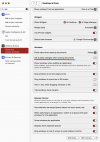
Just curious… When this happens, i.e. not prompting for save, or revert, etc., did you actually save the open file before quitting? I tested this on my system—create or edit a file—and then, without saving, quit or restart the Mac, and each time I always get the choices. The key is closing the session BUT NOT DOING A SAVE. If this does not happen for you, then there must be something really bad happening and you must hunt for the problem. I would first reinstall macOS, after doing a full backup, of course. I’m running macOS 15.5 (24F74) too.Sequoia 15.5
- Joined
- Feb 14, 2021
- Messages
- 1,239
- Reaction score
- 172
If I were in your position, I would immediately reinstall macOS after completing a full backup. A fresh installation of macOS is always beneficial and I usually do it at the mere hint of anything amiss. To make it easier, I always have a fresh copy of the current macOS installer for this purpose. The full operation usually takes less than an hour to perform.Saving before quitting or quitting without saving, it does not make a difference in behaviour
If the problem persists after the update, then the problem might be due to a third-party utility, and tracking it down could be more difficult. Still, odd behavior like this should never be allowed to persist.
- Joined
- Feb 14, 2021
- Messages
- 1,239
- Reaction score
- 172
The problem of not getting the prompt to save… etc.What "problem"?
- Joined
- Feb 14, 2021
- Messages
- 1,239
- Reaction score
- 172
Then you need to label your thread as “Solved.”I thought I made clear that this problem is solved. Read this thread again